



What is Bonree ONE Sage AI? It’s the natural-language interface of the Bonree ONE AI Workbench — the layer where an operator’s plain-language question gets routed to the right agent, Skill, tool, or knowledge base, without the operator needing to know which model or execution chain is actually running underneath.
The interesting design problem here isn’t “can a chatbot answer ops questions” — that’s solved. It’s routing: when someone types “why did checkout latency spike at 2pm,” how does the system decide whether that’s a database question, a network question, or a capacity question, and which of a dozen possible agents should actually handle it? Get routing wrong and you either get a generic non-answer or, worse, a confident answer from the wrong domain expert.
Two Conventions Do Most of the Routing Work
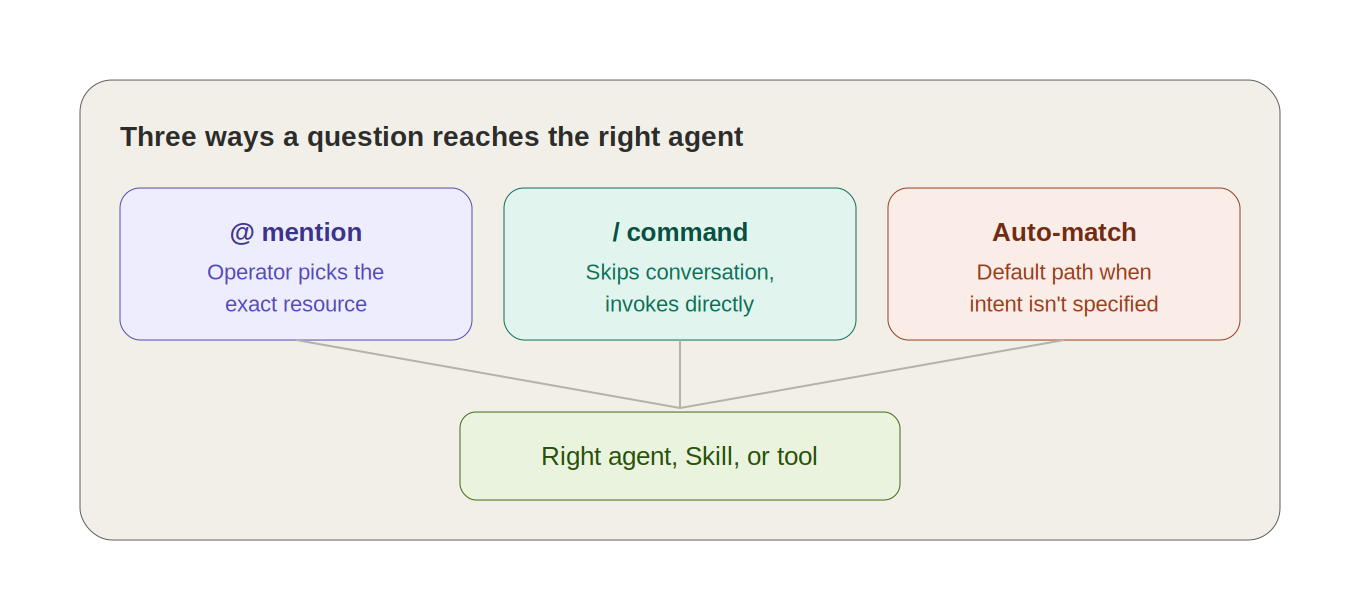
Bonree ONE Sage AI handles this with two lightweight, explicit conventions rather than trying to be clever about implicit intent every time:
● @ mentions pull a specific agent, Skill, tool, or knowledge base directly into the conversation’s context — the operator does the routing when they already know which resource they want.
● / commands invoke a Skill or platform instruction directly, skipping the conversational layer entirely for well-known operations.
For everything else, there’s auto-match, quick-select buttons for choosing an agent or Skill, an approval-policy control for how command execution gets reviewed before it runs, file upload for attaching a log snippet or config, and a model switcher for the current session. The design bet here is straightforward: give the system a default path (auto-match), but never make the explicit path harder to reach than the implicit one.
A Walkthrough: One Alert, One Conversation
Picture a P2 alert firing at 2:14am: elevated error rate on the checkout service. Instead of pulling up four dashboards, the on-call engineer opens Sage AI and either @-mentions an alert-diagnosis agent directly or just describes the alert and lets auto-match route it. The agent pulls the alert’s associated metrics, correlates recent deploys, checks related traces, and comes back with a structured hypothesis — not a link to a dashboard, an actual diagnosis with the supporting data attached. The engineer can keep questioning it in the same thread: “was there a deploy in the last hour,” “show me the slowest traces,” “what changed in the connection pool config” — each follow-up landing in the same context instead of starting a new investigation from scratch.
That continuity — a single thread that accumulates context across a whole investigation — is doing more work than the initial answer. Most of the value of a conversational interface over a dashboard shows up in the fifth question, not the first.
Built-In Experts Solve the Cold-Start Problem
A new user doesn’t start from a blank prompt box. The home screen surfaces a carousel of built-in expert agents — a database analysis expert, an intelligent support assistant, a capacity assessment assistant — each scoped to a domain with a defined set of capabilities and recommended questions. This matters more than it sounds like it should: the single biggest failure mode for any AI assistant rollout isn’t the model being wrong, it’s users not knowing what to ask it. Scoped experts with example prompts solve that by showing, not telling.
Governance Doesn’t Disappear Just Because It’s Conversational
Because Bonree ONE Sage AI sits on top of the same AI Workbench as everything else, conversations inherit the platform’s governance model rather than getting a lighter-weight version of it: conversations and resources are isolated by resource domain, command execution can be gated behind an approval policy before it runs, and every call an agent makes during a conversation is subject to the same audit logging as a scheduled automation task. A chat window is still a place where an agent can take real actions — it doesn’t get to skip the sandbox just because it looks like a chat window.
Where This Sits Against the Broader Assistant Landscape
Conversational, agent-routing interfaces have become table stakes across observability platforms, not a differentiator on their own. Datadog’s approach is Bits AI, a suite of purpose-built agents — including an SRE agent and a developer agent — plus a Bits Assistant interface, oriented around investigating and remediating issues collaboratively with the on-call team rather than answering isolated questions. Dynatrace has taken a related but architecturally different route: Dynatrace Intelligence pairs its Davis AI reasoning engine with coordinated agents aimed at autonomous, self-healing action, treating the assistant less as a chat window and more as one interface into a broader control system.
What actually differentiates a conversational layer isn’t the chat UX — it’s how tightly it’s wired into everything behind it. In Sage AI’s case, that means anything a team publishes internally becomes immediately @-mentionable, and any diagnostic conversation that proves useful can be promoted directly into a governed, scheduled automation task, covered in a companion piece on the Automation module, without leaving the conversation or switching tools.
FAQ
Do I need to know which agent or model to use before starting a conversation?
No. Describe the problem in plain language and let auto-match route it, or @ mention a specific agent, Skill, or knowledge base if you already know what you want.What happens if the resource I need isn’t available yet?
Sage AI prompts you to add it from the resource marketplace, or to publish it from the creation workspace, before it becomes @-mentionable in a conversation.Can a useful diagnostic conversation become a recurring task?
Yes. Describing a scheduling need directly in the conversation (“run this every morning at 8am”) triggers a confirmation step, and the task is written into the Automation module for that resource domain.Are conversations shared across an organization by default?
No. Conversations and the agents/Skills/knowledge bases visible in them are isolated by resource domain — switching domains changes what history and resources you can see.
Does a conversational agent bypass the platform’s normal approval requirements?
No. Command execution inside a Sage AI conversation is still subject to whatever approval policy is configured, and every call is logged the same way a scheduled task’s calls are.